
Note Workspace
A tabbed multi‑function workspace — summaries, transcript, Q&A, flashcards, quizzes, mind map, infographic and podcast.
Infographic
A one-page visual summary of your note. Open the preview to pan and zoom, then download it as a PNG or share it.
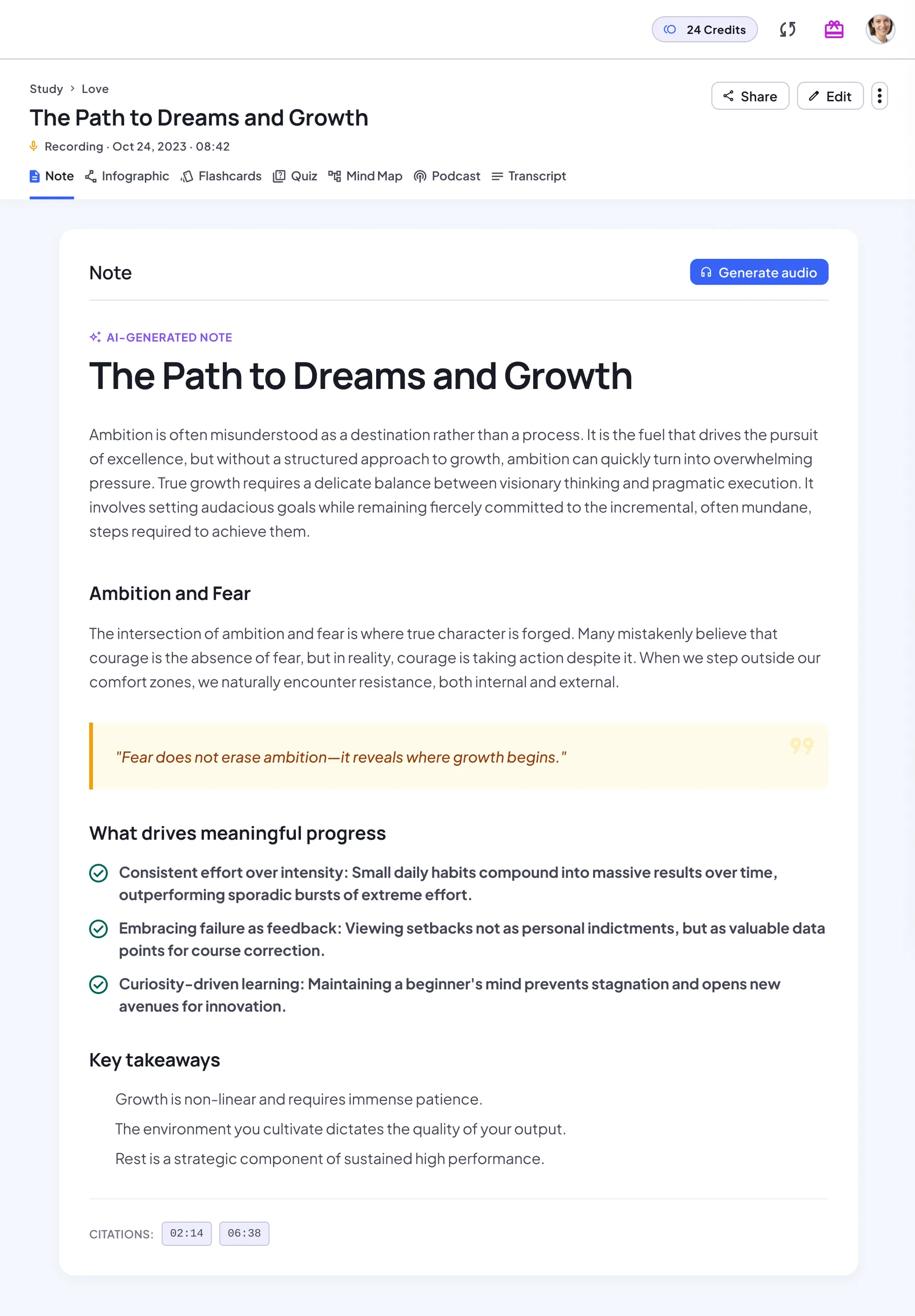
One note, seven ways to learn it
Every note you create opens with the same seven tabs, and AI Chat sits right beside them.
Note
The AI-written summary, which you can edit.
Infographic
A one-page visual poster of the key points.
Flashcards
Cards to flip and test your recall.
Quiz
Multiple-choice questions with explanations.
Mind Map
The structure of the note at a glance.
Podcast
A two-host audio episode about the note.
Transcript
The original source, always one tab away.
Built into every note
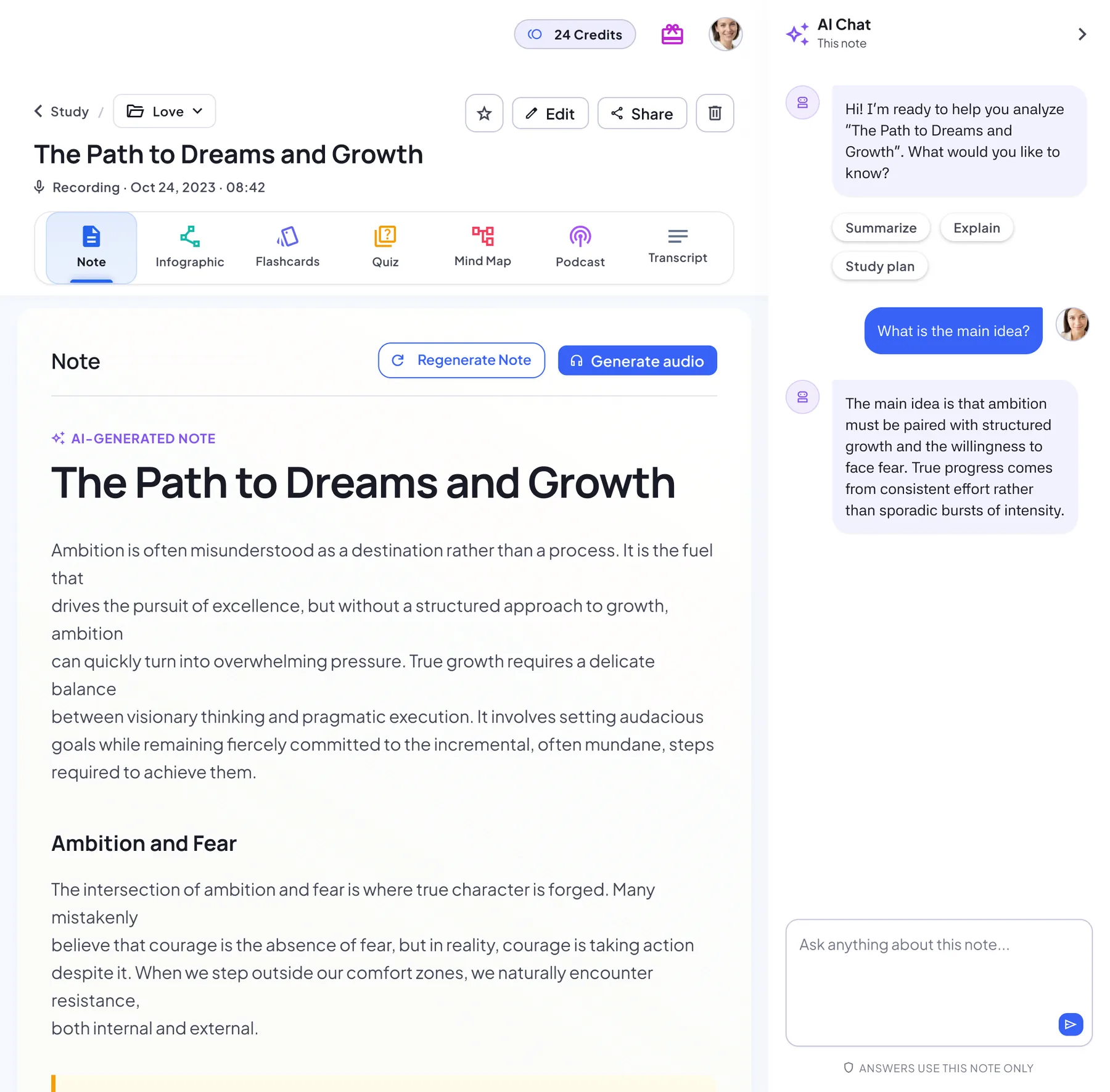
AI Chat
Ask questions beside any tab. Answers use this note only.
Notebook Summary
Combine every note in a notebook into one summary, and update it as you add notes.
Audio narration
Generate audio of the note itself, read by one voice.
Share links
Share a note with a link. Viewers don’t need an account.
Rich text editor
Edit the note with headings, lists, tables and to-do items.
Start from any source
Every note starts from one of six sources. Pick the one you have:
Why the Note Workspace
Common workflows
Meetings
- Record and get a full transcript
- AI summary of key points and takeaways
- Share minutes; list next steps as to‑dos
Lectures
- Capture audio or import slides (PDF)
- Review Summary Notes and key concepts
- Practice with flashcards and quizzes
Research reading
- Import a PDF or a web link
- Read the summary, then ask AI Chat
- Map the argument with a mind map
Self-study and languages
- Snap a photo of your notes or slides
- Drill with flashcards, then take the quiz
- Listen to the podcast on the go
Deep‑dive highlights
AI Summary Notes
- Multi‑level outline with highlights
- Full source text one tab away
Minutes
- Key points and takeaways from the meeting
- Edit freely and add to‑do lists
AI Q&A
- Ask context‑aware questions
- Answers use only this note
Flashcards & Quizzes
- Auto‑generated flashcards and quizzes
- Review every quiz question after you finish
Podcast
- Turn notes into audio episodes
- Choose two voices and a language
Collaboration & sharing
- Share minutes and notes with a link
- Viewers don't need to sign in
- Download mind maps and infographics as images
Workspace FAQ
Can I customize minutes and summaries?
Yes. Edit the note in the rich text editor, or regenerate it with AI.
How are action items tracked?
There's no separate task tracker. Add next steps as a to‑do list in the note and check them off as you go.
Is Note Workspace free to try?
Yes, you can start for free. Free use is limited; Pro unlocks unlimited AI notes. Podcasts are a Pro feature and use podcast credits.
Which sources can I start from?
Six: a live recording, an audio file, a PDF or Word document, images of notes or slides, typed text, and a web or YouTube link.
Does Regenerate overwrite my edits?
Regenerate replaces the current AI-generated result, so edits to it are replaced too. Your original source stays unchanged, and you’re asked to confirm first.
Can people I share with see flashcards and quizzes?
Yes. Anyone with the link can open the note and the tabs you’ve already generated, without signing in.
Explore more
Guides from our blog
- AI PDF Summarizer: Accuracy, Output, and When to Trust It
- What Is the Best AI Flashcard Generator? A 2026 Comparison
- PDF to Quiz: How to Generate Practice Questions from Any Document
- Mind Map Examples: Templates for Students and Work
- How to Turn Your Notes into a Podcast: A Practical Guide
- AI Meeting Minutes Generator: How to Automate Your Post-Meeting Documentation
Start your workspace
Capture, organize and act in one place.
No download needed — works in any browser
Scan to download